


August 7, 2011


Four things that come to mind...
1. When I have sp problems I also go and get the full package, which you can find at - http://www.microsoft.com/download/en/details.aspx?displaylang=en&id=5842 - you'll want one of the bottom 2 in the list depending on whether you're 32 or 64 bit.
2. If you do try the in place upgrade path be sure to use the ABR method - https://davescomputertips.com/2011/08/how-to-do-a-clean-install-of-windows-7-without-activation-on-your-oem-computer/ - which will allow you to backup your current activation and restore it *As long as the versions are the same*. As long as you backup Home Premium and restore to Home Premium (or Pro/Pro - Ultimate/Ultimate, etc) you should be fine.
3. If you use the non-Dell disk to install be sure to download all the drivers from the Dell site before you start. Also make sure you get the appropriate drivers for either 32 or 64 bit depending on which you install.
4. You cannot upgrade from 32 to 64 bit. You must stay in the same "bit" OS, so if you have 32 bit installed and want to move to 64 bit(which I highly recommend) it will require a complete wipe and install from the 64 bit media.


October 14, 2011
Since when isn't 7+1 = 8? I lost my whole reply on that one.
October 14, 2011
Dave said
Four things that come to mind...
1. When I have sp problems I also go and get the full package, which you can find at - http://www.microsoft.com/download/en/details.aspx?displaylang=en&id=5842 - you'll want one of the bottom 2 in the list depending on whether you're 32 or 64 bit.Got that. X17-58997-x64 2. If you do try the in place upgrade path be sure to use the ABR method - https://davescomputertips.com/2011/08/how-to-do-a-clean-install-of-windows-7-without-activation-on-your-oem-computer/ - which will allow you to backup your current activation and restore it *As long as the versions are the same*. As long as you backup Home Premium and restore to Home Premium (or Pro/Pro - Ultimate/Ultimate, etc) you should be fine.
Got that program now. Everything is Home Premium. 3. If you use the non-Dell disk to install be sure to download all the drivers from the Dell site before you start. Also make sure you get the appropriate drivers for either 32 or 64 bit depending on which you install.
I'm wondering since I have the Dell Win7 Upgrade disk if I can't get the drivers off that after upgrading with the retail disk? 4. You cannot upgrade from 32 to 64 bit. You must stay in the same "bit" OS, so if you have 32 bit installed and want to move to 64 bit(which I highly recommend) it will require a complete wipe and install from the 64 bit media.
Thanks guys...
October 14, 2011
You know what guys? I think I'm just going to bag it. I tried installing the SP1 to my laptop and got the same 80070490 error. According to Microsoft the CBS Manifest file is corrupt. What, on both computers as well as the hundreds of others I read about online? Sounds like a Microsoft problem to me and I think they should provide a "simple" fix for it instead of putting me and everybody else through hell. There are 4 updates on both computers that won't take either, otherwise I'm up to date. Gives me a really good reason to spend more time with Ubuntu.
Maybe some day I'll get bored and try the in-place-upgrade when I have no where to go and all day to get there and more assurance that it will work.
Thanks for hanging in there for me.

August 9, 2011
Sorry to hear that Steve, but I don't blame you in the least - these things can be very frustrating. I've been lucky, I've installed SP1 (direct from Windows Updates) on half a dozen Windows 7 machines to date and never had any sort of problem - go figure!!
Cheers mate...Jim
October 14, 2011
OK, I'm back - to install SP1. I decided to try the upgrade method after reading that my problem may be related to Windows Upgrade not being able to write to the HD. This time I had a different mindset, i.e., looked at the problem differently. I had totally forgot about our conversation here and your suggestion to use the Upgrade option. I think what my problem has been on both my laptop and my desktop is that I have Ubuntu installed as a dual-boot option. I also forgot about your Activation_Backup suggestion and did the wrong thing while performing the Upgrade. Fortunately I had heeded your suggestion and created the Activation_Backup file when it was first mentioned. And fortunately I hadn't wiped that USB key. Whew! So after coming back here to tell you about this, I found the backup and performed the Activation_Restore even though I had entered my key when I wasn't supposed to.  It worked so I'm home free on that one.
I was able to install the SP1 after the upgrade and everything else seems to be back to normal except my dual-boot option is gone. I ran Test_Disk to look at the HD partitions and it appears the Ubuntu partitions are still there. Can you tell me how to restore the dual-boot option? Hopefully I can restore that without killing the Windows Update functioning.
Thanks so much for your help.
August 9, 2011
Hi Steve - Good news and bad news then. 
Great to hear you finally got to install SP1. Best method to bring back the dual boot option might be to use the EasyBCD software... free for non-commercial use.
Read more and download here: http://neosmart.net/EasyBCD/
Cheers mate... Jim
October 14, 2011
OK.......!! Thanks for that suggestion. The "boot" subject is still foreign to me so I tread very carefully in that area. I tried EasyBCD, didn't really know what I was doing, but got brave and made a change. The first one didn't work, but the second change did. I got a menu of choices, Win7 or Ubuntu and it worked. It did do one thing that puzzles me though. Booting to Win7 is straight forward, but selecting Ubuntu brought up the old purple screen which had the old original menu of choices. How can I get rid of that?
This brings up an idea to try on my desktop. Installing Ubuntu brings up that purple menu and makes Ubuntu the default. I'm going to try and loose that menu, make Win7 the default and then see if SP1 will install. I may be onto something here. Wish me luck.
October 14, 2011
I got the first part of my question fixed. It was referenced on the Neosmart website.
However the second part about installing SP1 didn't work as I had hoped. I'll work on that some more as "Upgrading Windows" is extremely time intensive. Argh!
Stay tuned.
October 14, 2011
OK, here's the bottom line. I was not successful in getting SP1 to install any other way than running the UPGRADE. I had to admit defeat when I realized it was taking twice as long trying to find a way around it. So that's done and SP1 is installed. However, this time EasyBCD wouldn't get Ubuntu running. So I'm stuck with a working Windows that runs and a working Ubuntu that I can't access. When I select the Ubuntu option at the boot menu I get this result.
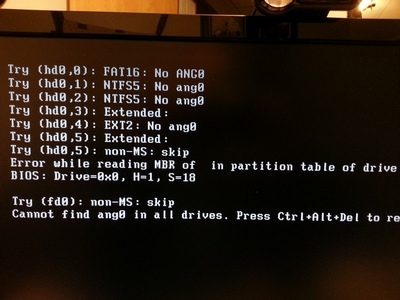

Any ideas how to fix that?
August 9, 2011
Hey Steve - I really don't have too much of a clue how you could fix that, maybe someone with a lot more Linux experience that I might have some ideas.
Have you tried starting all over with EasyBCD - delete all current boot menus and then add them back in again?
I had a similar problem once after restoring in image in a dual boot system created using EasyBCD. That method fixed it for me.
October 14, 2011
I did get that fixed. Using EasyBCD when I selected the Linux and Grub2 choices it had a default of "automatically" finding the grub menu. That failed and caused the error message. When I told it to look at "Boot", then it worked -- sort of. It still brings up the grub menu even though I edited it and set the delay time to 0. So, for some reason the results are slightly different on my desktop and laptop, but I'm tired of working on it and going to leave it alone for awhile.
Thanks again for all the help.


