Category Archive: Vista

Microsoft Vista operating system articles

Apr 17

Vista: End of support announced

Vista

Microsoft has ended full support for its ill-fated operating system as of 10th April with an extended support period through to April 2017.

This means that Microsoft will no longer be offering free technical support for Vista users nor will they continue honoring any warranty claims, and the only updates available to Vista users will …

Continue reading »

Permanent link to this article: http://www.davescomputertips.com/2012/04/vista-end-of-support-announced/

Aug 13

How to take ownership of a file in Windows 7 and Vista

admin_security

By default Windows 7 and Vista protect files and folders that it believes are important to the operating system. These files are even protected from users operating under administrative permissions. The reasoning behind this is two fold; first so the user doesn’t delete an important file which can render Windows unusable, and second to prevent …

Continue reading »

Permanent link to this article: http://www.davescomputertips.com/2011/08/how-to-take-ownership-of-a-file-in-windows-7-and-vista/

Aug 13

How to do a clean install of Windows 7 without activation on your OEM computer

windows_loading_files

Hey, you’ve bought a new computer with Windows 7 installed! Isn’t that great? Yes and no. PC Manufacturers have been installing many trial programs and helper applications, often called "bloatware". The manufacturers say they install this software to provide a better user experience and they can lower the computer cost because they get a cut …

Continue reading »

Permanent link to this article: http://www.davescomputertips.com/2011/08/how-to-do-a-clean-install-of-windows-7-without-activation-on-your-oem-computer/

Aug 13

How to change the Windows Vista system restore size

cmd_list_vssadmin

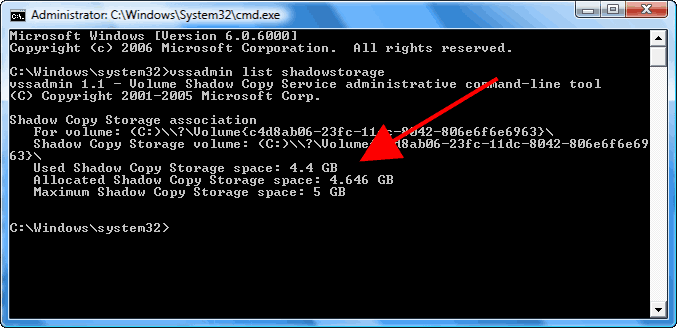
I’m sure many of you are familiar with Microsoft’s System Restore. Hopefully fewer of you have had to use it. For those of you who have no idea what I’m talking about I’ll explain.

Microsoft added a feature in Windows ME (Millennium Edition) which would save snapshots of your system at points in time and …

Continue reading »

Permanent link to this article: http://www.davescomputertips.com/2011/08/how-to-change-the-windows-vista-system-restore-size/

Aug 13

How to include Windows XP computers in your Vista or Windows 7 network map

network_map_empty

What is a Network Map?

Having multiple computers in the same home, or small office, is common. It’s becoming a rule, rather than an exception. Moms, Dads, and children all want to be online simultaneously as they work and play. As the number of computers increase so does the complexity of the network. Vista introduced …

Continue reading »

Permanent link to this article: http://www.davescomputertips.com/2011/08/how-to-include-windows-xp-computers-in-your-vista-or-windows-7-network-map/

Aug 11

Standard Windows keyboard shortcuts

clip_image002

Do you know what all of those different keys on your keyboard do? If you’re like most people you don’t have a clue what a good deal of them are capable of.

A lot of folks don’t even notice the Windows key on their keyboard and even if they do notice it, they don’t know …

Continue reading »

Permanent link to this article: http://www.davescomputertips.com/2011/08/standard-windows-keyboard-shortcuts/

Aug 11

What is a dll file?

Depending on the settings you have set in Windows you may see files with the file extension of “dll” in program directories and the Windows Folder. Others, who have not enabled the “Show hidden files and folders” setting won’t see them, but rest assured they are there! What are they? Why are there so many …

Continue reading »

Permanent link to this article: http://www.davescomputertips.com/2011/08/what-is-a-dll-file/

Aug 11

The Windows registry explained

regedit

You have heard about it. You have been warned about the dangers of messing with it. What is it?

The Windows registry is a central database for the Windows operation system. Settings and information that control hardware configuration, operating system configuration, installed software configuration, and user preferences are all stored in the registry. If you …

Continue reading »

Permanent link to this article: http://www.davescomputertips.com/2011/08/the-windows-registry-explained/

Aug 11

How to move, rename, and organize files in Windows

flash-calvary

Keeping your computer organized is important. Not only does it make you more productive, but should disaster strike it allows you to know where to look to recover those files. I generally keep items I’m currently working with on the desktop. It is an immediate notification that something needs attention. If I’m done downloading a …

Continue reading »

Permanent link to this article: http://www.davescomputertips.com/2011/08/how-to-move-rename-and-organize-files-in-windows/

Aug 10

Fix the caps lock problem in Windows

access_options

The caps lock button, which causes everything you type to be in capital letters, is often pressed by accident. The results aren’t life threatening, but having to retype a sentence or two can really tick me off. Many have looked all over the internet for a way to warn them when the Caps Lock key …

Continue reading »

Permanent link to this article: http://www.davescomputertips.com/2011/08/fix-the-caps-lock-problem-in-windows/